Finding a Document by Doc #
Every document in Healdan has a doc #: a whole number that’s unique across all Stores. It’s given when the document is filed and never changes, through every version, move and rename. A deleted document’s number is never given to another.
Going Straight to a Document
With the search box’s scope on Documents, type the doc # with a # in front and press Enter:
| Type | Finds |
|---|---|
#1234 | document 1234, at its current version |
#1234.2 or #1234v2 | version 2 as it stands: its latest snapshot |
#1234.2.1 or #1234v2.1 | exactly snapshot 2.1 |
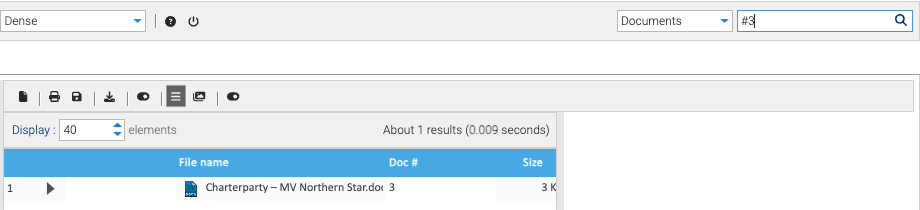
A space after the # is fine.
For
#1234, the Search tab lists just that document, ready to open, preview, download, or to look at its properties and versions.For a version or snapshot, a window titled “#1234 version 2.1” shows when that version was saved and by whom, with Preview and Download buttons. See Versions.
It’s found the moment it’s filed. Doc # lookups don’t wait for the search index.
If you can’t read the document, Healdan answers as if it didn’t exist: “No document #1234”. A version that doesn’t exist answers “Document #1234 has no version 2.1”.
Without the
#,1234is an ordinary full-text search, because numbers appear inside documents too.
Legacy Doc #
A document moved in from another document management system keeps its old number as its Legacy doc #
property. Healdan still gives it a doc # of its own, and # searches only doc #s, never legacy ones.