Healdan Settings
Healdan Settings
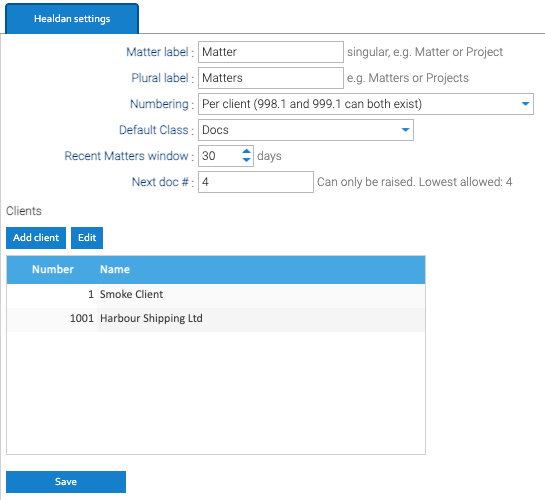
Healdan’s own settings are under Administration → Healdan → Settings. Click Save after changing them. Clients are saved from their own window, without Save.
| Setting | What it does |
|---|---|
| Matter label, Plural label | the word Healdan uses for a matter, such as Matter and Matters, or Project and Projects. It shows in the scope picker, the left pane’s lists, the New Matter dialog and this panel, and renames the Matter property and the right-click menu items. Others see it after they next sign in. “Client” can’t be changed |
| Numbering | per client or system-wide. See Matter Numbers |
| Default Class | the Class a document gets when nothing above it sets one. “Docs” to begin with |
| Recent Matters window | how many days of a person’s work their Recent Matters list covers. 30 to begin with |
| Next doc # | the number the next document gets. It can only be raised, for example to start at 1000 after a trial. The panel shows the lowest number allowed |
| Clients | the client list. Add client adds one, and Edit changes the selected client’s name |
The Class and Subclass Lists
The choices for Class and Subclass belong to the Healdan profile’s attribute set:
- Go to Administration → Document metadata → Templates, and open the Attribute sets tab.
- Select Healdan profile, then the Class or Subclass attribute, and open its Options.
- For each Subclass option, put the Class it belongs to in its Category. Healdan refuses a Subclass whose Category isn’t the document’s Class.